Shopify Flow lets you automate repetitive tasks in your store. Combined with the right app, it can generate unique discount codes automatically — no manual work, no shared codes, no spreadsheets.
This guide shows how to set up automatic unique code generation in Shopify Flow using the Bulk Discount Code Tool.
How it works
The Bulk Discount Code Tool adds a custom action to Shopify Flow called “Generate discount code”. This action creates a unique discount code on demand, every time the workflow runs.
A typical workflow looks like this:
- A trigger fires (order fulfilled, customer signs up, etc.)
- The “Generate discount code” action creates a unique code from your preconfigured discount set
- The code is passed to the next step — send an email, tag the customer, push to Klaviyo, or any other action
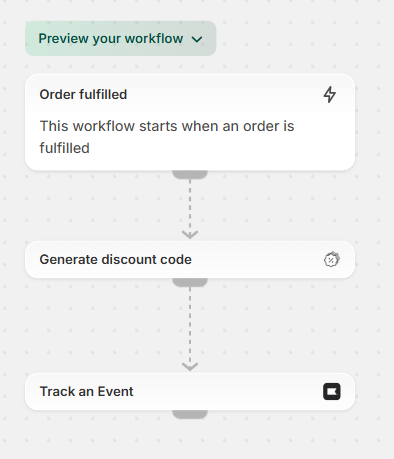
Each generated code is automatically registered in Shopify’s discount system. It follows the rules you set — percentage off, fixed amount, free shipping, usage limits, expiration dates, and product restrictions.
Setting up the workflow
1. Create a discount set in the app
Before building your Flow workflow, create a discount set in the Bulk Discount Code Tool. This defines the rules for every code generated: discount type, value, usage limits, eligible products, and expiration.
2. Add the trigger in Shopify Flow
Choose what starts the workflow. Common triggers:
- Order fulfilled — send a thank-you code for the next purchase
- Customer accepts marketing — deliver a welcome discount
- Order paid — generate a redemption voucher
- Customer tag added — reward VIP customers
3. Add the “Generate discount code” action
Select the Bulk Discount Code Tool action in your workflow. Choose the discount set you created. The action generates a unique code and returns it as a variable you can use in subsequent steps.
4. Deliver the code
Pass the generated code to your next action:
- Shopify Email — insert the code variable into your email template
- Klaviyo — send the code as an event property
- Customer metafield — store the code on the customer record
- Customer tag — add the code as a tag for later reference
Common use cases
Welcome discount automation
A customer subscribes to email marketing. Flow triggers automatically, generates a unique 10% off code with single use, and sends it via email. Every subscriber gets their own code — no sharing, no coupon site abuse.
“We are trying to put in place a welcome discount for 10% off 1 purchase for customers who subscribe to email marketing. We want to be able to have each customer receive a unique discount code so they cannot be shared.”
— Emilie Vermilyea, Ecommerce Lead
Post-purchase thank you
An order is paid or fulfilled. Flow generates a unique code for 15% off the next order and sends a thank-you email. Encourages repeat purchases with a code that only works once.
Buy now, create later
A customer purchases a personalizable product. Immediately after payment, Flow generates a unique discount code worth the order value (100% off up to that amount). The customer receives the code by email and redeems it later when ready to create their product.
“Our specific use case is implementing a ‘buy now, create later’ feature. This allows a customer to purchase a product now and immediately receive a discount code post-purchase, via email. They can then use this code to redeem their purchase at their convenience.”
— Photo personalization merchant
This works because the customer pays upfront, receives a unique redemption code, and uses it when ready. Shopify’s discount system tracks whether the code has been used. No additional tracking infrastructure needed.
Abandoned cart recovery
A cart is abandoned for more than an hour. Flow generates a unique code with 10% off and a 24-hour expiration, then sends a recovery email. The short expiration creates urgency. The unique code prevents abuse.
Birthday rewards
A customer’s birthday arrives (via a loyalty or CRM app). Flow generates a unique 20% off code and sends a birthday email. Personal, trackable, and single-use.
Why unique codes matter in automated workflows
Shared codes break when automated. If every welcome email contains the same “WELCOME10” code, it ends up on coupon sites within days. Your welcome discount becomes a public discount.
Unique codes solve this:
- Each customer gets a code that works only for them
- One-time use prevents sharing
- You can track which codes convert and which don’t
- Revoke individual codes without affecting others
- No coupon site leakage
What you need to get started
- Shopify plan with access to Shopify Flow (Basic plan or higher)
- Bulk Discount Code Tool installed from the Shopify App Store
- A configured discount set in the app with your desired rules
Setup takes minutes. Create your discount set, build the Flow workflow, and codes generate automatically from that point forward.
Get started
Install Bulk Discount Code Tool from the Shopify App Store.
Need to generate codes in bulk before setting up automation? Try our free coupon code generator tool. Create up to 10,000 codes with custom patterns and export as CSV.
Questions about Shopify Flow workflows? Contact us for guidance on your specific use case.