Shopify lets you add codes to an existing discount, but only one at a time. The Bulk Discount Code Tool adds an “Add codes to discount” action to any discount page — letting you generate thousands of new codes and append them to the same discount instantly.
How it works
Open any discount in Shopify admin. In the More actions menu, click Add codes to discount.

A generation overlay opens directly on the discount page. Configure your batch, click Add codes, and the new codes are appended to the existing discount.
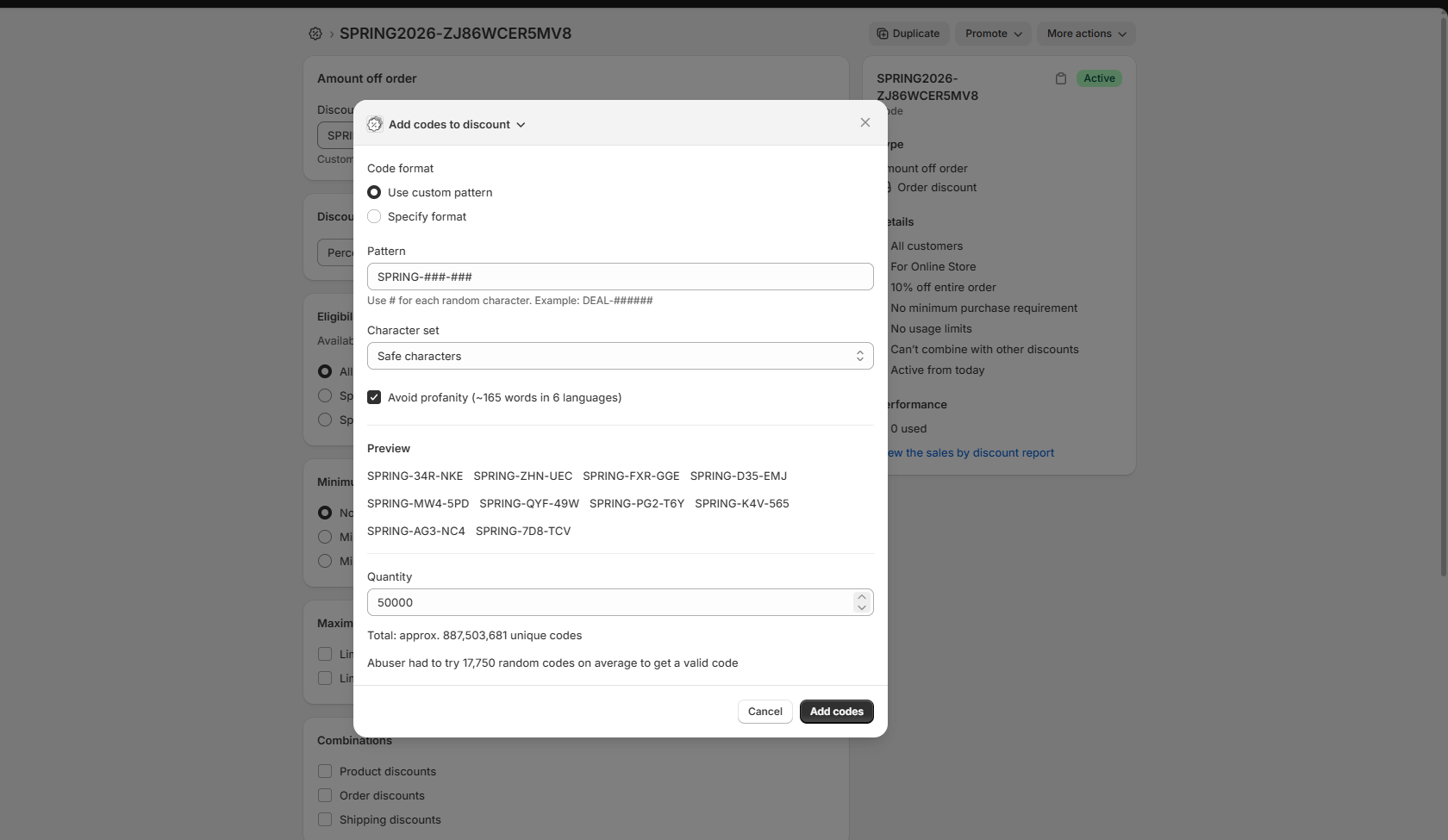
No redirect. No re-entering discount settings. The discount stays exactly as configured; you’re only adding codes to it.
Configuration options
Code format
Two options. “Use custom pattern” lets you define a template with # placeholders; each # is replaced by a random character from your chosen set. SPRING-###-### produces codes like SPRING-34R-NKE. “Specify format” is for fixed-structure codes with no random positions.
Pattern
Enter your template in the Pattern field. The # character marks each random position. You can use letters, numbers, and separators freely — only # is substituted.
Example patterns:
PROMO-####-####→PROMO-K4V5-565TDEAL-######→DEAL-ZHN8UCVIP###→VIP4GE
Character set
Select Safe characters to use an alphanumeric set that avoids visually ambiguous characters (0/O, 1/I/l). This reduces redemption errors when codes are printed or read aloud.
Avoid profanity
Enable this option to filter generated codes against a profanity list. Useful for codes that will be visible in marketing materials or printed.
Quantity
Enter the number of codes to generate. The overlay shows the total number of unique codes possible for your pattern, and the average number of attempts an attacker would need to guess a valid code — giving you a direct read on collision resistance.
Why add codes to an existing discount
When you’ve already distributed a discount — to an email list, through a partner, in a printed insert — and need more codes for a new wave, recreating the discount means reconfiguring every setting: eligibility, combinations, usage limits, start and end dates. One mistake and the new discount behaves differently from the original.
Adding codes to the existing discount avoids that entirely. All settings are inherited. The new batch of codes works exactly like the ones already in circulation.
Common scenarios:
Additional print run
Your first batch of mailer codes is running low. Generate more with the same pattern and add them to the same discount. No new setup needed.
Extended campaign
A promotion is performing well and you want to keep it going. Add a fresh batch to the original discount without touching any of the rules.
Partner top-up
A reseller or affiliate has distributed all their codes. Generate a new batch and add it to the same discount they’re already using.
Replacing exhausted codes
Codes are being used faster than expected. Top up without creating a new discount or updating any integrations that reference the original discount ID.
Works with all discount types
Add codes to any Shopify discount that supports multiple codes — amount off orders, percentage discounts, free shipping, BOGO offers, and product-specific discounts. The generation options are the same regardless of discount type.
Get started
Install Bulk Discount Code Tool from the Shopify App Store.
Open any existing discount, click More actions, and select Add codes to discount.
Questions? Contact us.