Shopify’s official abandoned checkout templates send a reminder, but they can’t give the customer a promo code of their own. This template can. It waits 24 hours, checks that the customer still hasn’t ordered, and then emails them a unique discount code that works once and expires a few days later.
You can install the Send a discount code when a customer abandons checkout template from Shopify Flow, or ask Sidekick to build a workflow like it for you.
Why use this instead of a shared code
Each customer gets their own code. A shared code ends up on coupon sites, and customers learn to abandon checkout on purpose to get it. A unique code works once, for one customer.
Each code expires on its own. Set the codes to expire 3 days after they’re created, for example. A customer who abandons checkout today gets 3 days, and so does a customer who abandons next month. You don’t need a separate discount for each campaign date.
Codes are made on demand. Bulk Discount Code Tool generates each code at the moment the workflow runs. You don’t upload a list of codes in advance, and you don’t need to watch how many are left.
What the workflow does
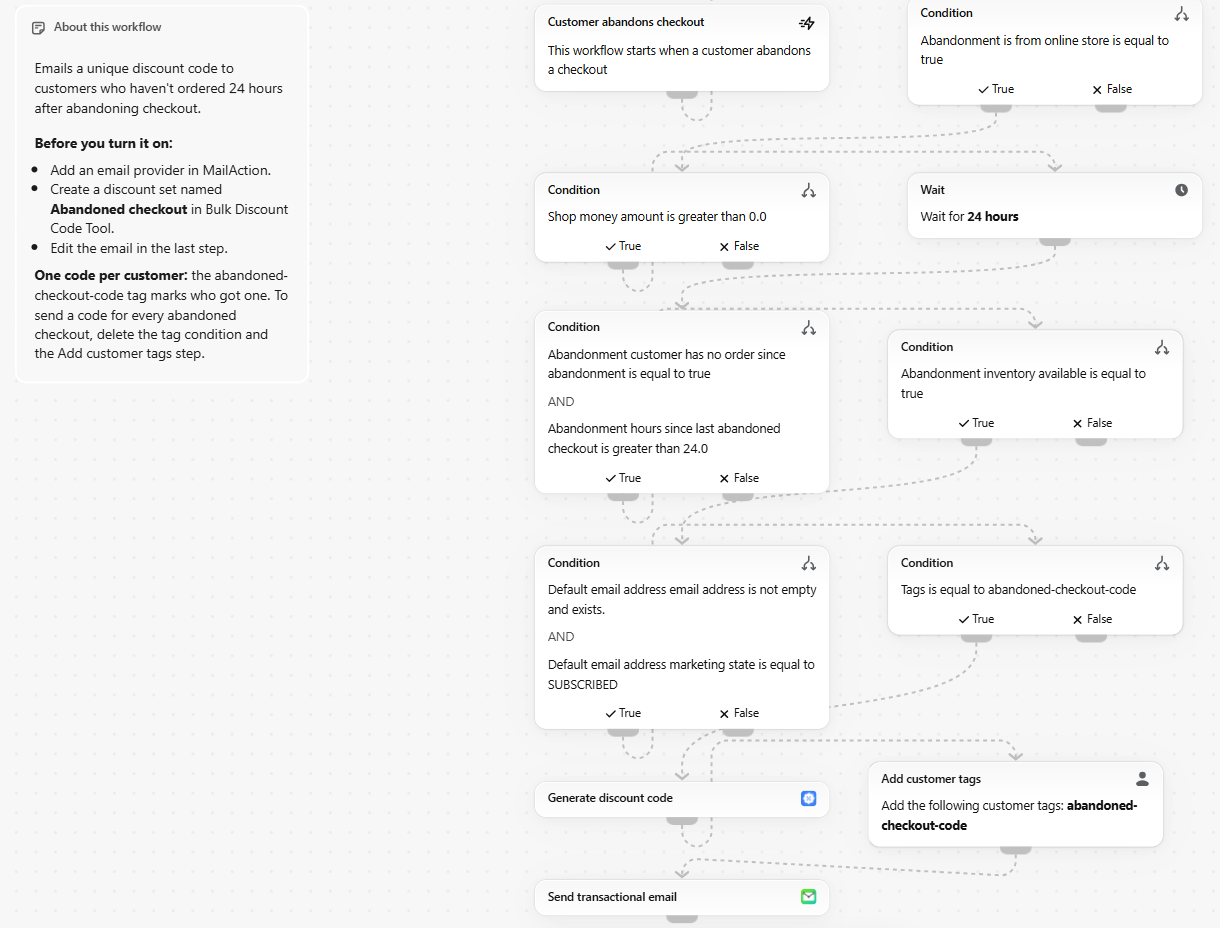
When a customer abandons checkout, the workflow:
- Checks the checkout came from your online store and its total is above 0.
- Waits 24 hours.
- Checks the customer hasn’t placed an order or abandoned another checkout since. If they abandoned a newer checkout, that checkout runs its own workflow, so the customer only gets one email.
- Checks the items in the checkout are still in stock.
- Checks the customer has an email address and is subscribed to email marketing.
- Checks the customer doesn’t have the
abandoned-checkout-codetag yet. - Generates a unique discount code from your Abandoned checkout discount set.
- Tags the customer with
abandoned-checkout-code. - Emails the code to the customer with MailAction.
If any check fails, the workflow stops and no code is created.
Before you turn it on
You need 3 things:
- Shopify Flow on a Shopify Basic plan or higher.
- Bulk Discount Code Tool to generate the codes.
- MailAction with an email provider connected, to send the email.
Shopify Messaging won’t work for this. Its email templates can’t use custom Flow variables, so it has no way to insert the generated code. Use a transactional email app that can, like MailAction. The template uses MailAction’s Send transactional email step.
1. Create the discount set
In Bulk Discount Code Tool, create a discount set named exactly Abandoned checkout. The workflow finds the set by this name.
- Choose Generate random codes. Sets made from uploaded or pasted codes can’t be used in Flow.
- Set the discount: for example, 10% off the order.
- Turn on Expire individual codes and set a short window, like 3 days. Each code expires that many days after it’s created, so the customer has a reason to come back soon. Learn more about per-code expiry.
A customer can use each code once.
2. Install the template
Open the template in Shopify Flow. It opens in your store’s admin, so log in first if you’re asked to. You can also go to Templates in Shopify Flow and search for abandons checkout.
3. Edit the email
Open the Send transactional email step at the end of the workflow. The template includes a subject line and email body with the code already in place:
Use code {{ generateDiscountCode.discount_code }} to finish your order.
Change the wording and design to match your store. Keep the {{ generateDiscountCode.discount_code }} variable where you want the code to appear.
4. Turn on the workflow
Select Turn on workflow. Every abandoned checkout that passes the checks now gets its own code.
Or ask Sidekick
If you’d rather build your own version, open a new workflow in Shopify Flow and describe it to Sidekick. For example:
When a customer abandons checkout, wait 24 hours. If they haven’t ordered, generate a discount code with Bulk Discount Code Tool from the Abandoned checkout set and email it to them with MailAction.
Sidekick builds a workflow like this one, which you can then review and change. If you want the checks above without writing them out, start from the template instead.
One code per customer
The abandoned-checkout-code tag marks customers who already got a code. Without it, a customer could abandon checkout every few days and collect a new discount each time.
To send a code for every abandoned checkout instead, delete 2 steps:
- The condition Tags is equal to abandoned-checkout-code
- The Add customer tags step
To let a customer get a code again later, remove the tag from their customer profile in Shopify admin.
Change the template
The template is an ordinary Flow workflow, and you can edit any step. A few common changes:
- To wait longer or shorter, change Wait for 24 hours. If you shorten it, change hours since last abandoned checkout is greater than 24.0 to the same number.
- To email customers who aren’t subscribed to marketing, remove the marketing state check. Check your local laws first.
- To skip small checkouts, change is greater than 0.0 to a minimum amount, like 30.
- To use a different email app, replace the MailAction step with an app that can read Flow variables, like Klaviyo.
Flow runs
Each plan includes a number of Flow runs a month:
- Free: 10 runs, enough to test the workflow
- Basic: 50 runs
- Pro: unlimited runs
A run only counts when it creates a code, so checkouts that fail a check don’t use one. Runs reset on the 1st of each month. See pricing.
Related solutions
- Unique discount codes in Shopify Flow: build your own workflows with the Generate discount code action
- Per-code expiry: give each code its own expiration window
- All discount code solutions
Get started
Install Bulk Discount Code Tool from the Shopify App Store and create the Abandoned checkout discount set. Then install the template from Shopify Flow, or ask Sidekick to build the workflow.
Questions about the template? Contact us.